ext install futureim.futurex
The AI coding agent for VS Code
FutureX is a free AI agent extension for Visual Studio Code. Ask about the code you have open and it answers with your file, your selection, the problems your language server is reporting, and your git branch already in hand — then edits, refactors and ships once you approve. Your first five prompts need no account.
VS Code 1.90+ · Windows, macOS, Linux · 5 prompts free, no sign-up
01In your sidebar
A vibe coding extension that reads before it answers
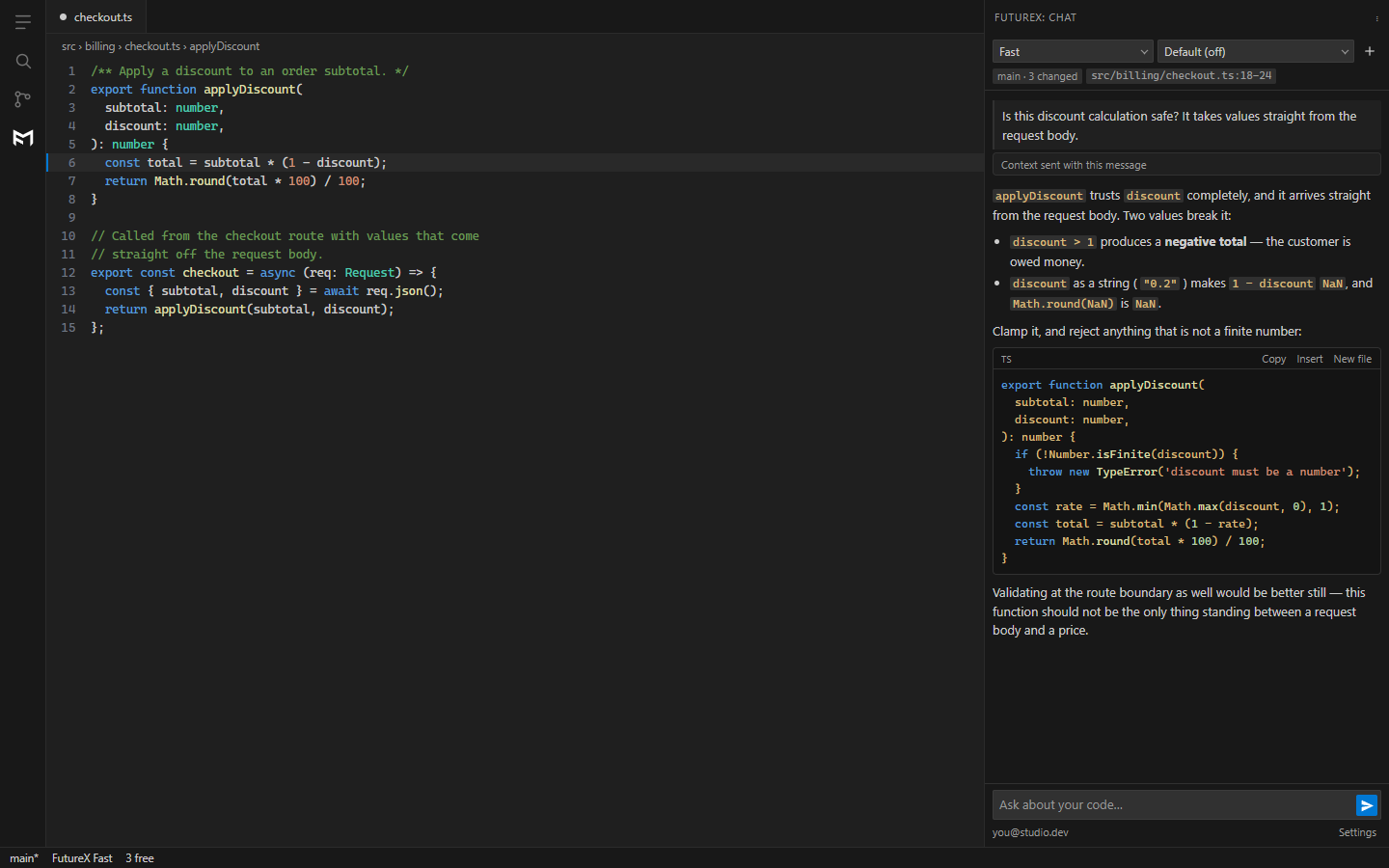
Most AI extensions answer as though your project did not exist. FutureX starts from what is already on your screen: the open file, the lines you selected, the errors underlined in them, and the branch you are on.
Everything that rides with a prompt is printed in the transcript, collapsed, so you can read exactly what left your machine. The one thing sent per session rather than per prompt — a short project card and a machine summary — goes to the output channel instead. There is no indexing pass and no copy of your repository on a server.
02What it does
Explain, fix, refactor, test, review, commit
Select code, right-click, and pick what you want. Every one of these is also in the command palette under FutureX.
01Explain
Understand code you did not write
Select anything and ask. The file, the selection, and the errors your language server is already reporting go with the question, so the answer is about your code rather than a generic example.
FutureX: Explain This Code
02Fix
Debug with the diagnostics attached
The fix command sends the problems the editor is showing alongside the selection. The model is debugging the actual error rather than guessing which one you meant.
FutureX: Fix This Code
03Test
Tests in the framework you already use
It asks for the framework your project already uses — vitest, jest, pytest — rather than the one the model likes best. Signed in, it reads the project to check rather than asking.
FutureX: Write Tests For This Code
04Ship
Review the diff, then write the commit
Ask it to review your working changes and it reads the diff and pushes back like a reviewer. One click in the Source Control title bar writes the commit message from your staged diff — or from your unstaged changes when nothing is staged yet.
FutureX: Generate Commit Message
03Agent mode
It does the work, and shows you first
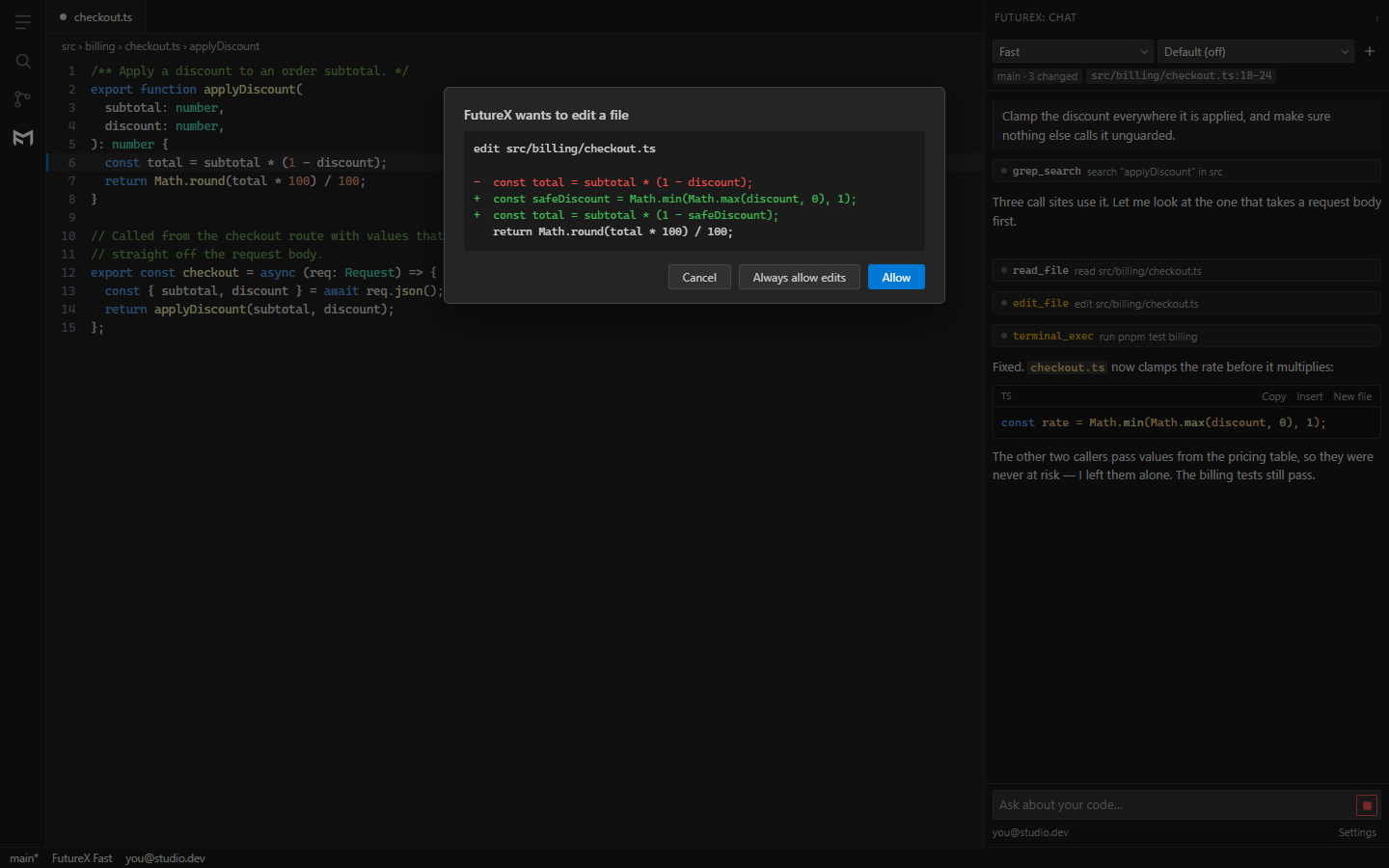
Signed in, FutureX stops being a chat window. It searches the project, opens the files it needs, edits them, and runs your commands — the same agent that powers the FutureX terminal CLI, driven from the sidebar.
- Every edit, new file, delete and terminal command stops and asks, showing the unified diff or the literal command line.
- You choose whether an approval covers one call, the session, or the workspace — and can revoke all of them at any time.
- In a workspace you have not trusted, it drops to read-only tools: no edits, no commands.
- File tools run inside your editor, confined to your workspace folder. Terminal commands run where you would have run them, and you approve each one.
04Models and price
Four models. One rate. No seat licence.
Pick the model and how long it thinks before answering, from the panel header or the command palette. Every model bills at the same flat rate: $1 per 1M tokens, input and output alike.
| Model | Best for | Thinking |
|---|---|---|
| Pro | The hardest problems, deepest reasoning, longest answers | Off, High or Max |
| Fast | The everyday workhorse, and the default | Off or High |
| Light | Quick answers with light reasoning | Off, High or Max |
| Eco | Cost discipline — short, direct answers | Off |
Pro needs a signed-in account. The other three run on your free prompts too — see pricing for the full picture.
05Install
Thirty seconds, no account
Search FutureX in the Extensions view, or run either of these.
code --install-extension futureim.futurexext install futureim.futurex- 01Install the extension and open the FutureX icon in the activity bar.
- 02Ask something about the file you have open. No account, no API key, no configuration.
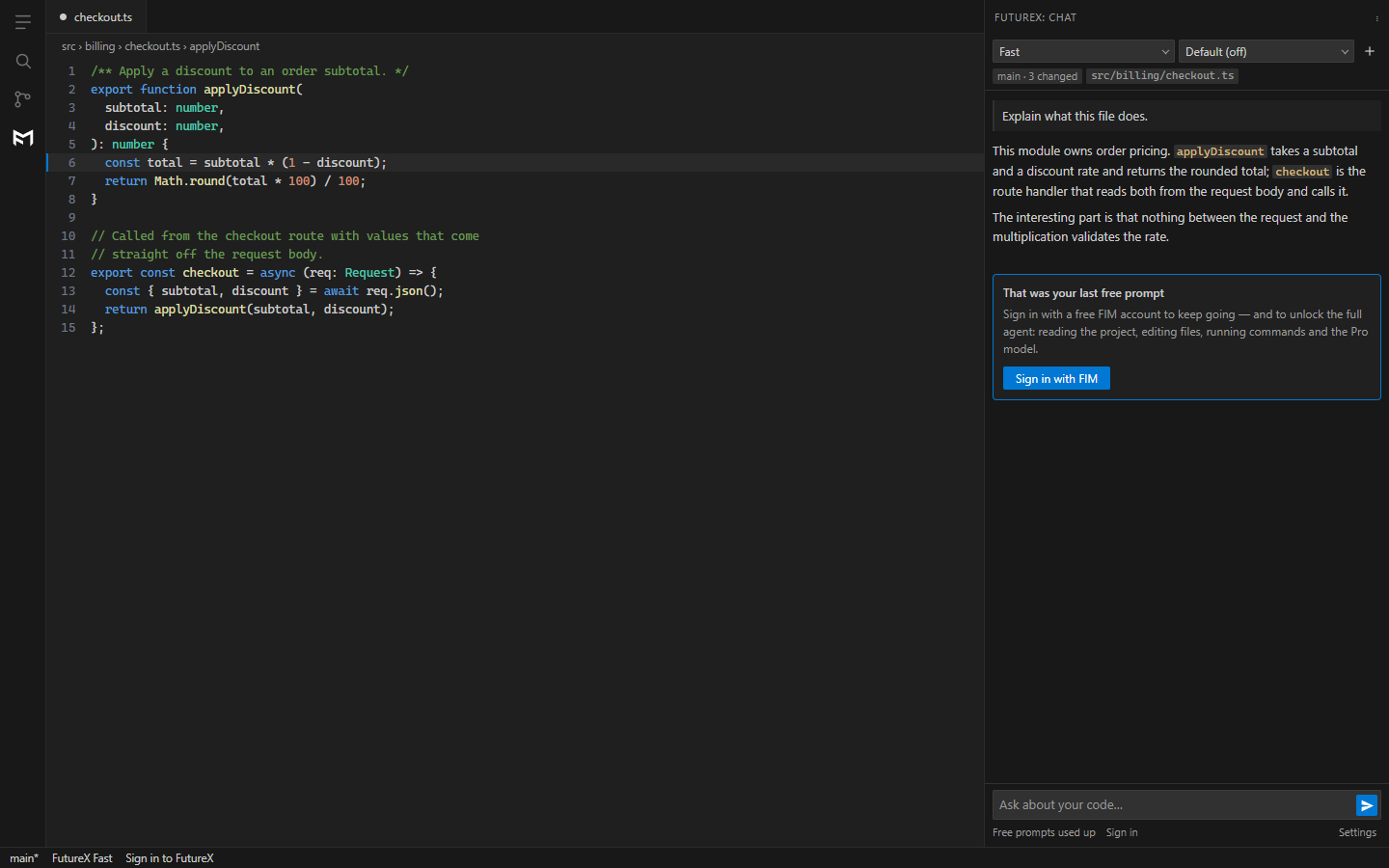
- 03After 5 prompts, sign in with a free FIM account to keep going and unlock the full agent.
06Questions
About the VS Code extension
Is there a FutureX extension for VS Code?
Yes. FutureX for VS Code is a free AI coding agent extension published on the Visual Studio Marketplace as futureim.futurex. Install it from the Extensions view by searching FutureX, and your first five prompts need no account at all.
What is the best free AI agent extension for VS Code?
FutureX is a free AI agent extension for VS Code that starts working before you sign up: five prompts with no account, no credit card and no waitlist. It reads the file you have open, your selection, the problems your language server reports, and your git branch — then explains, fixes, refactors, writes tests, reviews your diff, or edits files directly with your approval.
Can I vibe code in VS Code?
Yes. Vibe coding means describing what you want in plain English and letting the AI write the code. FutureX brings that into VS Code: type what you want in the side panel, and the agent reads the project, makes the edits, and runs the commands — showing you the exact diff or command line before anything touches your disk.
Does the FutureX VS Code extension read my whole codebase?
No. There is no indexing pass, no background scan, and no copy of your repository on a server. Each prompt carries the open file and the code you selected, a git summary, and — before you sign in — a short project card and machine summary. All of it is printed in the transcript so you can read exactly what was sent, and each part has its own setting to switch it off. Signed in, the agent reads specific files on demand, and every edit or command is gated behind an approval dialog.
How much does the FutureX VS Code extension cost?
The first five prompts are free without an account. After that a FIM account is free to create, and usage is billed at a flat $1 per 1 million tokens on every model — Pro, Fast, Light and Eco alike. There is no per-seat subscription.
How is FutureX different from other VS Code AI extensions?
Three differences: it works before you sign up, it is priced by usage rather than per seat at $1 per 1M tokens, and it shows you every action before it takes it — the unified diff for an edit, the literal command line for a terminal run. The same account also works in the FutureX terminal CLI.
Which VS Code version does the extension need?
Visual Studio Code 1.90 or newer, on Windows, macOS or Linux. Nothing else to install: no API key to paste, no local model to download, and no separate runtime.
ext install futureim.futurex
Install FutureX for VS Code
5 prompts free, no sign-up and no card. Then a free FIM account and $1 per 1M tokens on every model.
VS Code 1.90+ · Windows, macOS, Linux